
I picked RabbitMQ for a project that needed event replay. It was the wrong call. Not because RabbitMQ is bad, it’s not, but because six months in, someone asked “can we reprocess last Tuesday’s events?” and the answer was no. The messages were gone. Acknowledged and deleted, like they never existed.
I spent the next month migrating to Kafka. It wasn’t fun. The whole experience taught me that the Kafka vs RabbitMQ decision isn’t about which one is “better.” It’s about which one is less wrong for what you’re actually building.
What a Message Queue Actually Does (In Case You Need the Refresher)
A message queue sits between services so they don’t have to call each other directly. A producer fires off a message, and a consumer picks it up whenever it’s ready. The value is straightforward:
- Resilience: if a consumer is down, messages wait in the queue instead of vanishing
- Scalability: spin up more consumers during traffic spikes
- Fault tolerance: messages persist until they’re processed successfully
Simple concept. The complexity is in the details, and that’s where Kafka and RabbitMQ diverge hard.
Apache Kafka
What It Actually Is
Kafka isn’t really a message queue. It’s a distributed event streaming platform that LinkedIn built to handle trillions of events per day. It treats data as an immutable, append-only log of events. Think of it less like a queue and more like a ledger that never forgets.
Architecture
Kafka’s core concepts:
- Topics: logical channels where messages are published. Categories, basically.
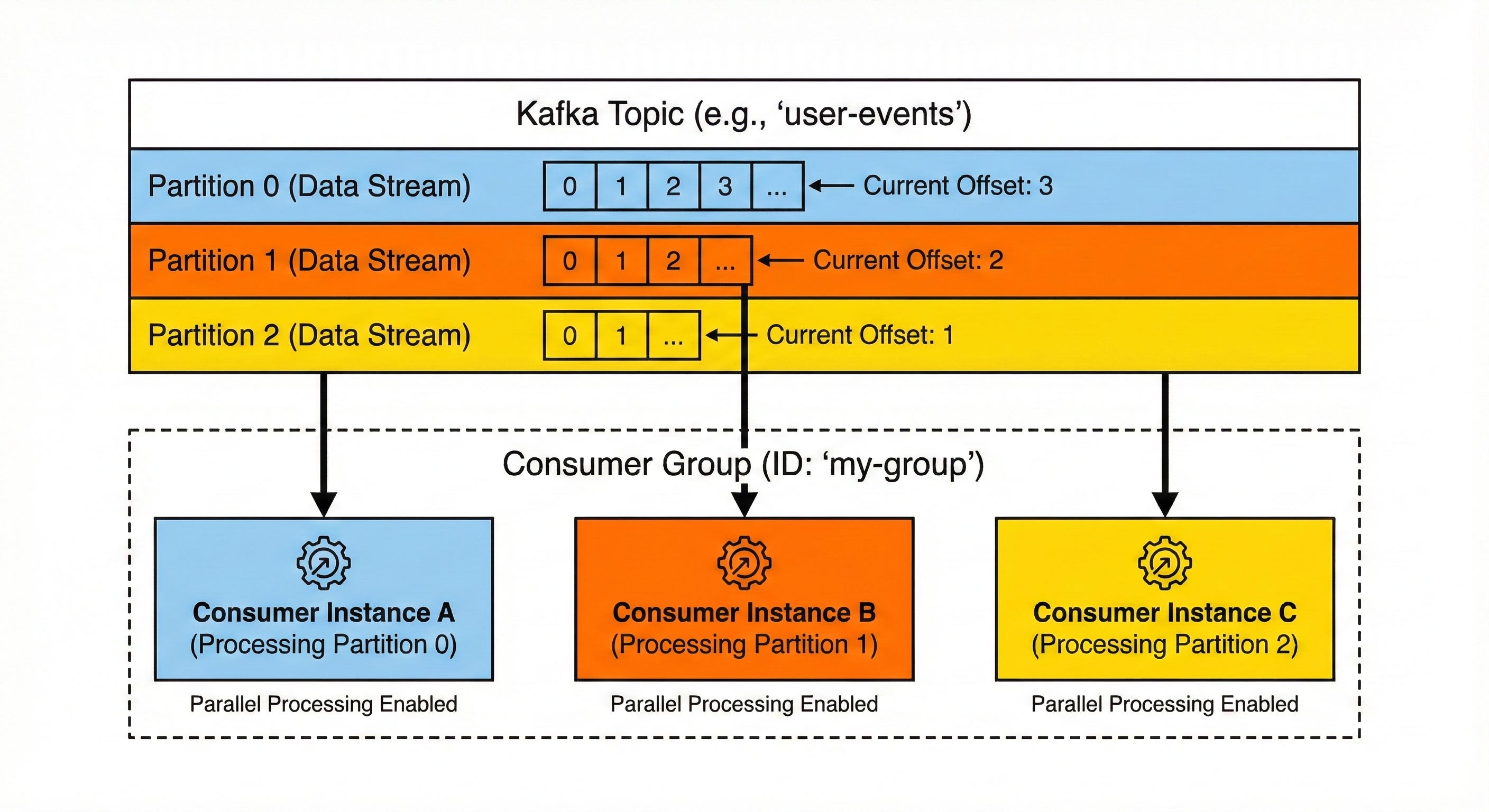
- Partitions: each topic gets split into partitions. This is Kafka’s trick for parallelism: multiple consumers read from different partitions at the same time.
- Brokers: the Kafka servers that store and serve data. A cluster runs several of these.
- Producers: apps that publish messages to topics.
- Consumers: apps that read messages, organized into consumer groups.
Producer [Partition 0] Consumer Group A
         [Partition 1] Consumer Group A
         [Partition 2] Consumer Group A
A few things that matter:
- Messages are not deleted after consumption. They stick around for a configurable retention period: days, weeks, or forever.
- Ordering is guaranteed within a partition: not across partitions.
- Consumers pull messages at their own pace using an offset pointer.
How the Log Works
- A producer sends a message to a topic. Kafka appends it to a partition log.
- The message gets an offset, a sequential ID within that partition.
- Consumers maintain their own offset. Reset it, and you can re-read old messages.
- Multiple consumer groups can read the same topic independently, each group gets its own copy.
Topic: "orders"
├── Partition 0: [msg1, msg2, msg3, msg4, ...]
├── Partition 1: [msg5, msg6, msg7, msg8, ...]
└── Partition 2: [msg9, msg10, msg11, msg12, ...]

Consumer Group "fraud-detection" reads: msg1-12
Consumer Group "analytics" reads: msg1-12 (independently!)
Consumer Group "notifications" reads: msg1-12 (independently!)
What Kafka Is Good At
- High throughput: millions of messages per second. It was built for this scale.
- Event sourcing: the immutable log is a natural audit trail. Replay events from any point in time.
- Stream processing: Kafka Streams and ksqlDB let you transform and join streams in real time.
- Multi-subscriber: multiple services consume the same data without extra plumbing.
- Durability: data is persisted to disk and replicated across brokers. Nothing gets lost.
RabbitMQ
What It Actually Is
RabbitMQ is a traditional message broker implementing the AMQP protocol. Built in Erlang, it focuses on flexible routing, reliable delivery, and being straightforward to operate.
Architecture
RabbitMQ’s core concepts:
- Exchanges: entry points that receive messages from producers. They decide where messages go.
- Queues: buffers that hold messages until a consumer picks them up.
- Bindings: rules that connect exchanges to queues.
- Routing keys: labels on messages that exchanges use for routing decisions.
Producer Exchange [Queue A] Consumer 1
                    [Queue B] Consumer 2
                    [Queue C] Consumer 3
Exchange Types (Where RabbitMQ Gets Interesting)
This is RabbitMQ’s superpower. Four exchange types give you precise control over routing:
| Exchange Type | Behavior |
|---|---|
| Direct | Routes to a queue whose binding key exactly matches the routing key |
| Topic | Routes based on pattern matching (order.*, *.error) |
| Fanout | Broadcasts to all bound queues (ignores routing keys) |
| Headers | Routes based on message headers instead of routing keys |
# Topic Exchange Example
# Binding pattern "order.us.*" matches:
#   order.us.created [x]
#   order.us.shipped [x]
#   order.eu.created [ ]
How It Works
- Producer sends a message to an exchange with a routing key.
- Exchange routes the message to one or more queues based on bindings.
- Consumers subscribe to queues and receive messages.
- After a consumer acknowledges (ACK) a message, it’s removed from the queue.
The critical difference from Kafka: messages are deleted after consumption. Once a consumer ACKs: the message is gone. There’s no going back.
What RabbitMQ Is Good At
- Complex routing: the exchange/binding model handles sophisticated routing that Kafka would need workarounds for.
- Task distribution: perfect for worker queues where each task goes to exactly one worker.
- Message-level granularity: ACKs, NACKs, dead-letter exchanges, message TTL, priority queues. Fine-grained control.
- Ease of operation: simpler to set up and manage for small to medium workloads.
- Low latency: typically sub-millisecond delivery for small messages.
Kafka vs RabbitMQ: Side-by-Side
| Aspect | Apache Kafka | RabbitMQ |
|---|---|---|
| Model | Distributed event log | Message queue (AMQP) |
| Message retention | Persistent (configurable time/size) | Deleted after consumption |
| Throughput | Millions of messages/sec | Tens of thousands/sec |
| Latency | Milliseconds | Sub-millisecond (small messages) |
| Routing | Simple (topic-based) | Rich (direct, topic, fanout, headers) |
| Message ordering | Guaranteed within a partition | Guaranteed within a queue (single consumer) |
| Consumption model | Pull-based | Push-based (configurable prefetch) |
| Multi-subscriber | Consumer groups get independent copies | Exchanges route copies to multiple queues |
| Replay | Built-in (reset consumer offset) | Not natively supported |
| Protocol | Custom binary protocol over TCP | AMQP 0-9-1, 1.0, MQTT, STOMP |
| Language | Java/Scala | Erlang |
| Complexity | Higher operational overhead | Moderate, easier to manage |
When Kafka Is the Right Call
Event-Driven Architectures
You’re building a system where multiple services need to react to the same events independently. An order placed triggers inventory updates, email notifications, fraud checks, and analytics, all reading from the same topic without stepping on each other.
Event Sourcing & CQRS
You need an immutable, replayable log of every state change. Kafka is practically purpose-built for this. Your entire application state can be reconstructed by replaying events from the beginning.
Stream Processing
Real-time aggregations, joins, or transformations on data in motion, clickstream analysis, dashboards, anomaly detection. Kafka Streams or Flink on Kafka handles this well.
Log Aggregation & Metrics
Collecting logs and metrics from hundreds or thousands of services and feeding them into centralized systems like Elasticsearch or data lakes.
High-Volume Data Pipelines
Moving massive amounts of data between systems, database change data capture, IoT telemetry, piping data into warehouses.
Don’t Use Kafka When
- Your message volume is low (hundreds per second). RabbitMQ is simpler.
- You need complex per-message routing logic.
- You want to get started quickly with minimal operational overhead.
- Your primary need is task distribution (each message goes to exactly one worker).
When RabbitMQ Is the Right Call
Microservices Communication
Services need to talk to each other without direct dependencies. RabbitMQ’s flexible routing sends commands and events exactly where they need to go.
Background Job Processing
Task queues where workers process jobs asynchronously, image resizing, email sending, PDF generation. Each job is handled by one worker, ACK’d when done, retried on failure.
Request-Reply Patterns
RPC-style communication where a service sends a request and waits for a reply. RabbitMQ’s reply-to mechanism is built for this.
Complex Routing Scenarios
You need to route messages based on multiple attributes, pattern matching, or header values. Think of a logistics system where a “package.picked.up” event goes to different queues depending on region, carrier, and priority.
Low-Latency Use Cases
Financial trading systems, real-time bidding, or any scenario where sub-millisecond delivery matters.
Don’t Use RabbitMQ When
- You need to replay historical messages from days or weeks ago.
- Multiple independent services each need their own copy of every message.
- Your throughput exceeds tens of thousands of messages per second.
- You need long-term message persistence for compliance or auditing.
Can You Use Both?
Yeah, absolutely. Lots of organizations run Kafka and RabbitMQ side by side. A common pattern:
Services: RabbitMQ (task distribution, RPC)
Events: Kafka (event streaming, analytics, CDC)
Kafka might ingest raw data and feed processed results into RabbitMQ for delivery to downstream services. Or RabbitMQ handles the sync request-reply traffic while Kafka captures the event stream for analytics.
Quick Decision Flowchart
Need to replay messages from the past?
├── Yes: Kafka
└── No: Continue...

Need >100k messages/sec throughput?
├── Yes: Kafka
└── No: Continue...

Need complex routing (patterns, headers, selective delivery)?
├── Yes: RabbitMQ
└── No: Continue...

Need sub-millisecond latency?
├── Yes: RabbitMQ
└── No: Continue...

Multiple services need independent copies of every message?
├── Yes: Kafka
└── No: RabbitMQ
Quick Code Examples
Kafka: Producer & Consumer
// Producer
Properties props = new Properties();
props.put("bootstrap.servers", "localhost:9092");
props.put("key.serializer", "org.apache.kafka.common.serialization.StringSerializer");
props.put("value.serializer", "org.apache.kafka.common.serialization.StringSerializer");

KafkaProducer<String, String> producer = new KafkaProducer<>(props);
producer.send(new ProducerRecord<>("orders", "order-123", "{\"status\": \"placed\"}"));

// Consumer
Properties consumerProps = new Properties();
consumerProps.put("bootstrap.servers", "localhost:9092");
consumerProps.put("group.id", "fraud-detection");
consumerProps.put("key.deserializer", "org.apache.kafka.common.serialization.StringDeserializer");
consumerProps.put("value.deserializer", "org.apache.kafka.common.serialization.StringDeserializer");

KafkaConsumer<String, String> consumer = new KafkaConsumer<>(consumerProps);
consumer.subscribe(List.of("orders"));

while (true) {
    for (ConsumerRecord<String, String> record : consumer.poll(Duration.ofMillis(100))) {
        System.out.println("Processing: " + record.value());
    }
}
RabbitMQ: Publisher & Consumer
# Publisher
import pika

connection = pika.BlockingConnection(pika.ConnectionParameters('localhost'))
channel = connection.channel()
channel.exchange_declare(exchange='orders', exchange_type='topic')
channel.basic_publish(
    exchange='orders',
    routing_key='order.created',
    body='{"status": "placed"}'
)
connection.close()

# Consumer
def callback(ch, method, properties, body):
    print(f"Received: {body}")
    ch.basic_ack(delivery_tag=method.delivery_tag)

connection = pika.BlockingConnection(pika.ConnectionParameters('localhost'))
channel = connection.channel()
channel.exchange_declare(exchange='orders', exchange_type='topic')
result = channel.queue_declare(queue='', exclusive=True)
queue_name = result.method.queue
channel.queue_bind(exchange='orders', queue=queue_name, routing_key='order.*')
channel.basic_consume(queue=queue_name, on_message_callback=callback)
channel.start_consuming()
What I’ve Learned the Hard Way
If you’re still torn, here’s my honest take: start with RabbitMQ. It’s simpler to set up, simpler to operate, and you’ll know when you’ve outgrown it. Migrating from RabbitMQ to Kafka later is a common and well-documented path, I’ve done it, and it’s not the worst thing in the world.
But if you know from the start that you need event replay, high throughput, or multiple independent consumers reading the same data, just go with Kafka from day one. retrofitting it later costs more than doing it right the first time.
The wrong choice isn’t picking one over the other. It’s picking one without thinking about what your system actually needs six months from now.
Resources
- Apache Kafka Documentation
- RabbitMQ Documentation
- Kafka: The Definitive Guide (O’Reilly)
- RabbitMQ in Depth (Manning)
- Confluent Developer - Free Kafka courses
Member discussion
0 commentsStart the conversation
Become a member of >hacksubset_ to start commenting.
Already a member? Sign in